Add-ons
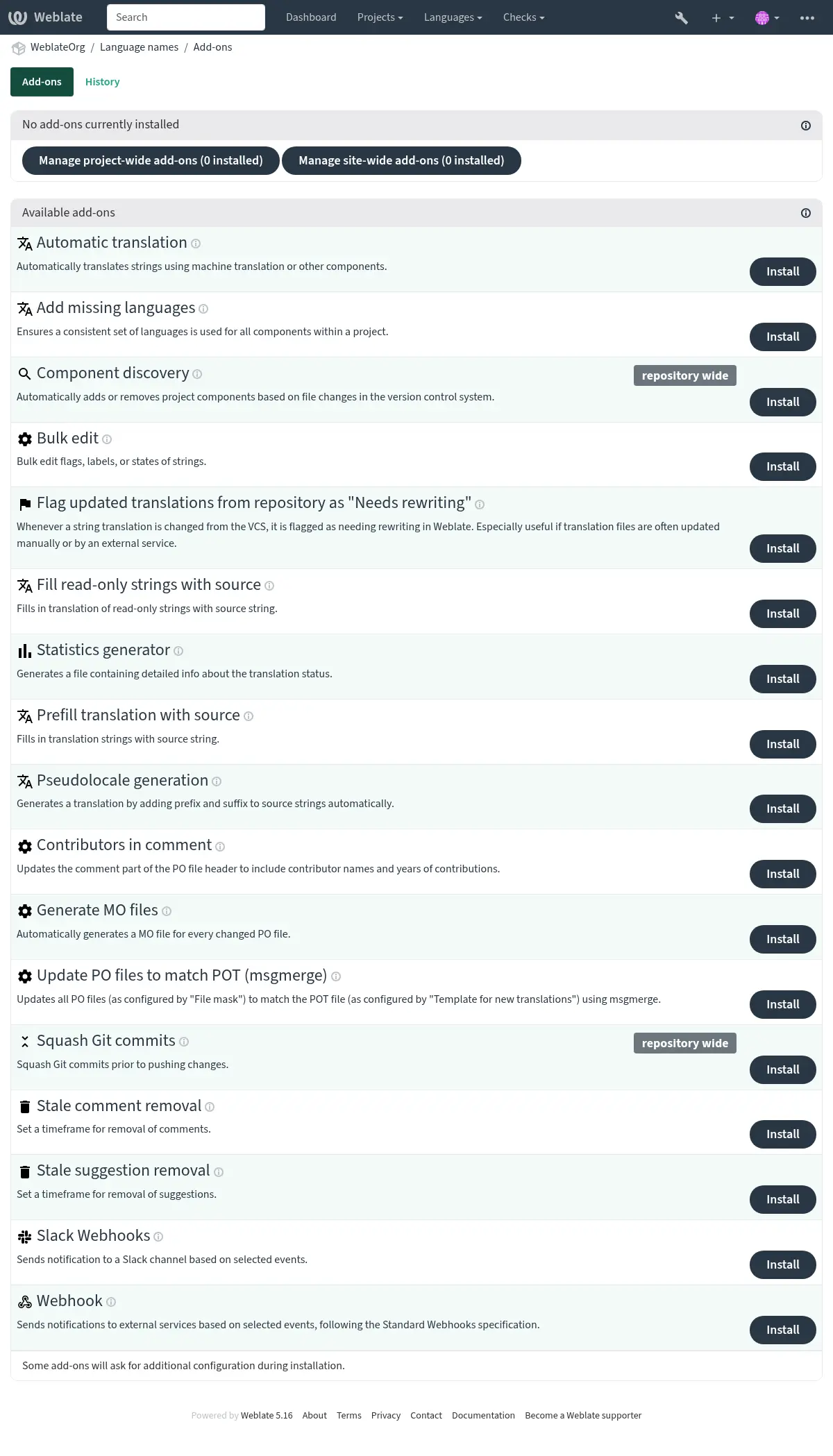
Add-ons provide ways to customize and automate the translation workflow. Admins can add and manage add-ons from the Operations ↓ Add-ons menu of each respective translation project or component. Add-ons can be also installed site-wide in Management interface.
Hint
You can also configure add-ons using API,
DEFAULT_ADDONS, or install_addon.
Events that trigger add-ons
Add-on installation
Triggered when add-on is being installed.
Component update
Triggered whenever a change happens in a component such as:
Strings are changed in the repository.
A string is added.
A new translation is added.
Daily
Triggered daily, but add-ons usually split the daily load between components depending on BACKGROUND_TASKS.
Event change
Triggered after a Change event is created.
Repository post-add
Triggered just after the new translation is added and committed.
Repository post-commit
Triggered just after the changes are committed.
Repository post-push
Triggered just after the repository is pushed upstream.
Repository post-update
Triggered whenever new changes are pulled from the upstream repository.
Repository pre-commit
Triggered just before the changes are committed.
Repository pre-push
Triggered just before the repository is pushed upstream.
Repository pre-update
Triggered just before the repository update is attempted.
Unit post-save
Triggered just after the string is saved.
Unit post-sync
Triggered after the string is synchronized with the VCS.
Unit pre-create
Triggered just after the newly created string is saved.
Built-in add-ons
Automatic translation
- Add-on ID:
weblate.autotranslate.autotranslate- Configuration:
modeAutomatic translation mode
Available choices:¶ suggestAdd as suggestion
translateAdd as translation
fuzzyAdd as “Needing edit”
qQuery
Please note that translating all strings will discard all existing translations.
auto_sourceSource of automated translations
Available choices:¶ othersOther translation components
mtMachine translation
componentComponent
Enter slug of a component to use as source, keep blank to use all components in the current project.
enginesMachine translation engines
thresholdScore threshold
- Triggers:
Automatically translates strings using machine translation or other components.
JavaScript localization CDN
Added in version 4.2.
- Add-on ID:
weblate.cdn.cdnjs- Configuration:
thresholdTranslation threshold
The percentage of translated strings that must be present for translation to be included.
css_selectorCSS selector
CSS selector to detect localizable elements.
cookie_nameLanguage cookie name
Name of cookie which stores language preference.
filesExtract strings from HTML files
List of filenames in current repository or remote URLs to parse for translatable strings.
- Triggers:
Add-on installation, Daily, Repository post-commit, Repository post-update
Publishes translations into content delivery network for use in JavaScript or HTML localization.
Can be used to localize static HTML pages, or to load localization in the JavaScript code.
Generates a unique URL for your component you can include in HTML pages to localize them. See Translating HTML and JavaScript using Weblate CDN for more details.
Note
This add-on requires additional configuration on the Weblate server.
LOCALIZE_CDN_PATH configures where generated files will be
written (on a filesystem), and LOCALIZE_CDN_URL defines where
they will be served (URL). Serving of the files is not done by Weblate and
has to be set up externally (typically using a CDN service).
This add-on is configured on Hosted Weblate and serves the files
via https://weblate-cdn.com/.
Remove blank strings
Added in version 4.4.
- Add-on ID:
weblate.cleanup.blank- Configuration:
This add-on has no configuration.
- Triggers:
Add-on installation, Repository post-commit, Repository post-update
Removes strings without a translation from translation files.
Use this to not have any empty strings in translation files (for example if your localization library displays them as missing instead of falling back to the source string).
Cleanup translation files
- Add-on ID:
weblate.cleanup.generic- Configuration:
This add-on has no configuration.
- Triggers:
Add-on installation, Repository post-update, Repository pre-commit
Update all translation files to match the monolingual base file. For most file formats, this means removing stale translation keys no longer present in the base file.
For formats containing additional content besides translation strings (such as HTML files, Windows RC files, or OpenDocument Format) this also brings the translation file in sync with the base file.
Add missing languages
- Add-on ID:
weblate.consistency.languages- Configuration:
This add-on has no configuration.
- Triggers:
Ensures a consistent set of languages is used for all components within a project.
Note
The components shared from other projects are not considered in this.
Missing languages are checked once every 24 hours, and when new languages are added in Weblate.
Unlike most others, this add-on affects the whole project.
Hint
Auto-translate the newly added strings with Automatic translation.
Component discovery
- Add-on ID:
weblate.discovery.discovery- Configuration:
matchRegular expression to match translation files against
file_formatFile format
name_templateCustomize the component name
base_file_templateDefine the monolingual base filename
Leave empty for bilingual translation files.
new_base_templateDefine the base file for new translations
Filename of file used for creating new translations. For gettext choose .pot file.
intermediate_templateIntermediate language file
Filename of intermediate translation file. In most cases this is a translation file provided by developers and is used when creating actual source strings.
language_regexLanguage filter
Regular expression to filter translation files against when scanning for file mask.
copy_addonsClone add-ons from the main component to the newly created ones
removeRemove components for inexistent files
- Triggers:
Automatically adds or removes project components based on file changes in the version control system.
The matching is done using regular expressions enabling complex configuration, but some knowledge is required to do so. Some examples for common use cases can be found in the add-on help section.
The regular expression to match translation files has to contain two named groups to match component and language. All named groups in the regular expression can be used as variables in the template fields.
You can use Django template markup in all filename fields, for example:
{{ component }}Component filename match
{{ component|title }}Component filename with upper case first letter
{{ path }}: {{ component }}Custom match group from the regular expression
Once you hit Save, a preview of matching components will be presented, from where you can check whether the configuration actually matches your needs:
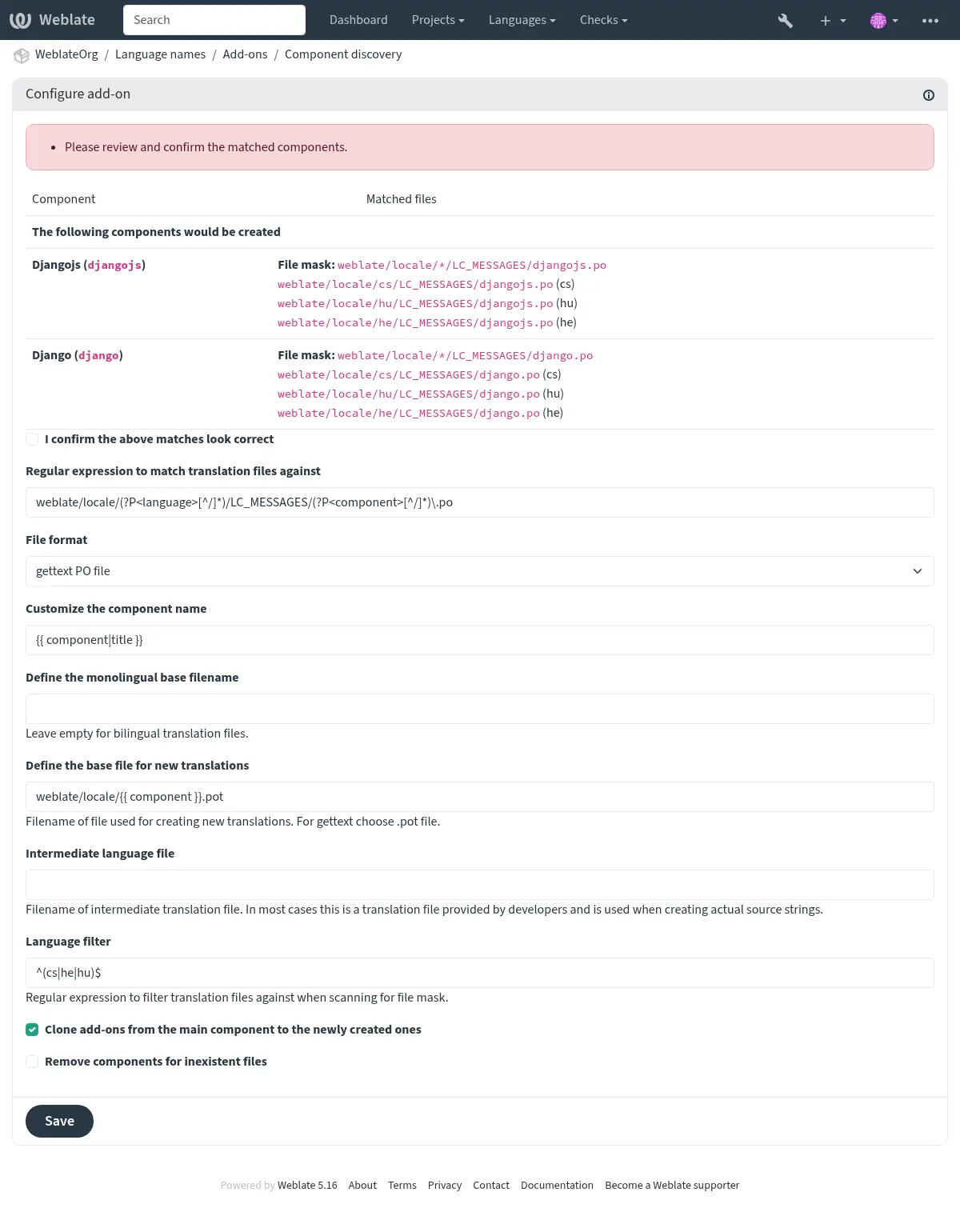
Component discovery examples
One folder per language
One folder per language containing translation files for components.
- Regular expression:
(?P<language>[^/.]*)/(?P<component>[^/]*)\.po- Matching files:
cs/application.pocs/website.pode/application.pode/website.po
Gettext locales layout
Usual structure for storing gettext PO files.
- Regular expression:
locale/(?P<language>[^/.]*)/LC_MESSAGES/(?P<component>[^/]*)\.po- Matching files:
locale/cs/LC_MESSAGES/application.polocale/cs/LC_MESSAGES/website.polocale/de/LC_MESSAGES/application.polocale/de/LC_MESSAGES/website.po
Complex filenames
Using both component and language name within filename.
- Regular expression:
src/locale/(?P<component>[^/]*)\.(?P<language>[^/.]*)\.po- Matching files:
src/locale/application.cs.posrc/locale/website.cs.posrc/locale/application.de.posrc/locale/website.de.po
Repeated language code
Using language in both path and filename.
- Regular expression:
locale/(?P<language>[^/.]*)/(?P<component>[^/]*)/(?P=language)\.po- Matching files:
locale/cs/application/cs.polocale/cs/website/cs.polocale/de/application/de.polocale/de/website/de.po
Split Android strings
Android resource strings, split into several files.
- Regular expression:
res/values-(?P<language>[^/.]*)/strings-(?P<component>[^/]*)\.xml- Matching files:
res/values-cs/strings-about.xmlres/values-cs/strings-help.xmlres/values-de/strings-about.xmlres/values-de/strings-help.xml
Matching multiple paths
Multi-module Maven project with Java properties translations.
- Regular expression:
(?P<originalHierarchy>.+/)(?P<component>[^/]*)/src/main/resources/ApplicationResources_(?P<language>[^/.]*)\.properties- Component name:
{{ originalHierarchy }}: {{ component }}- Matching files:
parent/module1/submodule/src/main/resources/ApplicationResources_fr.propertiesparent/module1/submodule/src/main/resources/ApplicationResource_es.propertiesparent/module2/src/main/resources/ApplicationResource_de.propertiesparent/module2/src/main/resources/ApplicationResource_ro.properties
Hint
Component discovery add-on uses Weblate internal URLs. It’s a convenient way to share
VCS setup between multiple components. Linked components use the local repository of
the main component set up by filling weblate://project/main-component
into the Source code repository field (in Operations ↓ Settings ↓
Version control system) of each respective component.
This saves time with configuration and system resources too.
Hint
Ensure the new component contains the full set of translatable languages with Add missing languages.
Warning
To be discovered, a new component must contain a file that matches base_file_template
and at least one file with a name that matches match – i.e., the component must
contain a base language file and at least one existing translation. Otherwise, it will be
ignored.
See also
Fedora Messaging
Added in version 5.15.
- Add-on ID:
weblate.fedora_messaging.publish- Configuration:
eventsChange events
amqp_hostAMQP broker host
The AMQP broker to connect to.
amqp_sslUse SSL for AMQP connection
ca_certCA certificates
Bundle of PEM encoded CA certificates used to validate the certificate presented by the server.
client_keyClient SSL key
PEM encoded client private SSL key.
client_certClient SSL certificates
PEM encoded client SSL certificate.
- Triggers:
Sends notifications to a Fedora Messaging compatible AMQP exchange.
Fedora Messaging is AMQP-based publisher for all changes happening in Weblate. You can hook additional services on changes happening in Weblate using this.
Message topic
All messages have topic
weblate.<action>.<project>.<component>.<translation>. The action is
lowercase textual representation of action with underscores instead of space,
for example resource_update, all other parts are optional and represent
slug of the object or a language code.
Message body
The body consists of following fields (given that they are available for the event):
change_idNumerical ID of change
actionVerbose name of the change.
timestampISO formatted timestamp
targetNew value of the change (eg. new translation of the string)
oldOld value of the change (eg. previous translation of the string)
sourceSource string.
urlAbsolute URL to view the related object.
authorAuthor username (this can be different from user for example when accepting suggestions)
userActing username
projectProject slug
componentComponent slug
translationTranslation language code
Message headers
There are additional headers which you might utilize for routing as well:
actionVerbose name of the change.
projectProject slug
componentComponent slug
Example messages
Repository merge event:
{
  "id": 1,
  "action": "Merged repository",
  "timestamp": "2017-06-15T11:30:47.325000+00:00",
  "url": "http://example.com/projects/test/test/",
  "component": "test"
}
New source string event:
{
  "id": 2,
  "action": "New source string",
  "timestamp": "2017-06-15T11:30:47.372000+00:00",
  "url": "http://example.com/translate/test/test/cs/?checksum=6412684aaf018e8e",
  "component": "test",
  "translation": "cs",
  "source": ["Hello, world!\n"]
}
Resource update event:
{
  "id": 6,
  "action": "Resource update",
  "timestamp": "2017-06-15T11:30:47.410000+00:00",
  "url": "http://example.com/projects/test/test/cs/",
  "project": "test",
  "component": "test",
  "translation": "cs"
}
{
  "id": 7,
  "action": "Resource update",
  "timestamp": "2017-06-15T11:30:47.510000+00:00",
  "url": "http://example.com/projects/test/test/de/",
  "project": "test",
  "component": "test",
  "translation": "de"
}
{
  "id": 8,
  "action": "Resource update",
  "timestamp": "2017-06-15T11:30:47.595000+00:00",
  "url": "http://example.com/projects/test/test/it/",
  "project": "test",
  "component": "test",
  "translation": "it"
}
Project removal event:
{
  "id": 9,
  "action": "Removed project",
  "timestamp": "2019-10-17T15:57:08.559420+00:00",
  "target": "test",
  "user": "testuser"
}
New contributor event:
{
  "id": 11,
  "action": "New contributor",
  "timestamp": "2019-10-17T15:57:08.759960+00:00",
  "url": "http://example.com/translate/test/test/cs/?checksum=6412684aaf018e8e",
  "author": "testuser",
  "user": "testuser",
  "project": "test",
  "component": "test",
  "translation": "cs",
  "source": ["Hello, world!\n"]
}
New translation event:
{
  "id": 12,
  "action": "New translation",
  "timestamp": "2019-10-17T15:57:08.772591+00:00",
  "url": "http://example.com/translate/test/test/cs/?checksum=6412684aaf018e8e",
  "target": ["Ahoj svete!\n"],
  "author": "testuser",
  "user": "testuser",
  "project": "test",
  "component": "test",
  "translation": "cs",
  "source": ["Hello, world!\n"]
}
Bulk edit
- Add-on ID:
weblate.flags.bulk- Configuration:
qQuery
stateState to set
Available choices:¶ -1Do not change
10Needs editing
11Needs editing (Needs rewriting)
12Needs editing (Needs checking)
20Translated
30Approved
add_flagsTranslation flags to add
remove_flagsTranslation flags to remove
add_labelsLabels to add
remove_labelsLabels to remove
- Triggers:
Bulk edit flags, labels, or states of strings.
Examples:
Search query |
|
|---|---|
Labels to add |
recent |
Search query |
|
|---|---|
Translation flags to add |
|
Search query |
|
|---|---|
Translation flags to add |
|
Flag unchanged translations as “Needs rewriting”
- Add-on ID:
weblate.flags.same_edit- Configuration:
This add-on has no configuration.
- Triggers:
Whenever a new translatable string is imported from the VCS and it matches a source string, it is flagged as needing rewriting in Weblate. Especially useful for file formats that include source strings for untranslated strings.
Hint
You might also want to tighthen the Unchanged translation check by adding
strict-same flag to Translation flags.
See also
Flag new source strings as “Needs checking”
- Add-on ID:
weblate.flags.source_edit- Configuration:
This add-on has no configuration.
- Triggers:
Whenever a new source string is imported from the VCS, it is flagged as needing checking in Weblate. This way you can easily filter and edit source strings written by the developers.
See also
Flag new translations as “Needs rewriting”
- Add-on ID:
weblate.flags.target_edit- Configuration:
This add-on has no configuration.
- Triggers:
Whenever a new translatable string is imported from the VCS, it is flagged as needing rewriting in Weblate. This way you can easily filter and edit translations created by the developers.
See also
Flag updated translations from repository as “Needs rewriting”
- Add-on ID:
weblate.flags.target_repo_update- Configuration:
This add-on has no configuration.
- Triggers:
Whenever a string translation is changed from the VCS, it is flagged as needing rewriting in Weblate. Especially useful if translation files are often updated manually or by an external service.
See also
Fill read-only strings with source
Added in version 4.18.
- Add-on ID:
weblate.generate.fill_read_only- Configuration:
This add-on has no configuration.
- Triggers:
Fills in translation of read-only strings with source string.
Statistics generator
- Add-on ID:
weblate.generate.generate- Configuration:
filenameName of generated file
templateContent of generated file
- Triggers:
Generates a file containing detailed info about the translation status.
You can use a Django template in both filename and content, see Template markup for a detailed markup description.
For example generating a summary file for each translation:
- Name of generated file
locale/{{ language_code }}.json- Content
{
   "language": "{{ language_code }}",
   "strings": "{{ stats.all }}",
   "translated": "{{ stats.translated }}",
   "last_changed": "{{ stats.last_changed }}",
   "last_author": "{{ stats.last_author }}",
}
See also
Prefill translation with source
Added in version 4.11.
- Add-on ID:
weblate.generate.prefill- Configuration:
This add-on has no configuration.
- Triggers:
Fills in translation strings with source string.
All untranslated strings in the component will be filled with the source string, and marked as needing edit. Use this when you can not have empty strings in the translation files. .. AUTOGENERATED START: weblate.generate.pseudolocale .. This section is automatically generated by ./manage.py list_addons. Do not edit manually.
Pseudolocale generation
Added in version 4.5.
- Add-on ID:
weblate.generate.pseudolocale- Configuration:
sourceSource strings
targetTarget translation
All strings in this translation will be overwritten
prefixPrepended static text
var_prefixPrepended variable text
suffixAppended static text
var_suffixAppended variable text
var_multiplierVariable text multiplier
How many times to repeat the variable text depending on the length of the source string.
include_readonlyInclude read-only strings
- Triggers:
Generates a translation by adding prefix and suffix to source strings automatically.
Pseudolocales are useful to find strings that are not prepared for localization. This is done by altering all translatable source strings to make it easy to spot unaltered strings when running the application in the pseudolocale language.
Finding strings whose localized counterparts might not fit the layout is also possible.
Using the variable parts makes it possible to look for strings which might not
fit into the user interface after the localization - it extends the text based
on the source string length. The variable texts are repeated by length of the
text multiplied by the multiplier. For example Hello world with variable
text _ and variable multiplier of 1 becomes Hello world___________ -
the text is repeated once for each character in the source string.
The strings will be generated using following pattern:
Prepended static text Prepended variable text Source string Appended variable text Appended static text
Hint
You can use real languages for testing, but there are dedicated pseudolocales available in Weblate - en_XA and ar_XB.
Hint
You can use this add-on to start translation to a new locale of an existing language or similar language. Once you add the translation to the component, follow to the add-on. Example: If you have fr and want to start fr_CA translation, simply set fr as the source, fr_CA as the target, and leave the prefix and suffix blank.
Uninstall the add-on once you have the new translation filled to prevent Weblate from changing the translations made after the copying.
Contributors in comment
- Add-on ID:
weblate.gettext.authors- Configuration:
This add-on has no configuration.
- Triggers:
Updates the comment part of the PO file header to include contributor names and years of contributions.
The PO file header will look like this:
# Michal Čihař <michal@weblate.org>, 2012, 2018, 2019, 2020.
# Pavel Borecki <pavel@example.com>, 2018, 2019.
# Filip Hron <filip@example.com>, 2018, 2019.
# anonymous <noreply@weblate.org>, 2019.
Update ALL_LINGUAS variable in the “configure” file
- Add-on ID:
weblate.gettext.configure- Configuration:
This add-on has no configuration.
- Triggers:
Updates the ALL_LINGUAS variable in “configure”, “configure.in” or “configure.ac” files, when a new translation is added.
Updates the ALL_LINGUAS variable in configure, configure.in or any
configure.ac files, when a new translation is added.
Customize gettext output
Removed in version 5.13: Replaced by File format parameters.
Update LINGUAS file
- Add-on ID:
weblate.gettext.linguas- Configuration:
This add-on has no configuration.
- Triggers:
Updates the LINGUAS file when a new translation is added.
Generate MO files
- Add-on ID:
weblate.gettext.mo- Configuration:
pathPath of generated MO file
If not specified, the location of the PO file will be used.
fuzzyInclude strings needing editing
Strings needing editing (fuzzy) are typically not ready for use as translations.
- Triggers:
Automatically generates a MO file for every changed PO file.
The location of the generated MO file can be customized and the field for it uses Template markup.
Note
If a translation is removed, its PO file will be deleted from the repository, but the MO file generated by this add-on will not. The MO file must be removed from the upstream manually.
Update PO files to match POT (msgmerge)
Changed in version 5.13: Settings configuration has been moved to File format parameters.
- Add-on ID:
weblate.gettext.msgmerge- Configuration:
This add-on has no configuration.
- Triggers:
Updates all PO files (as configured by “File mask”) to match the POT file (as configured by “Template for new translations”) using msgmerge.
This add-on is essential when working with gettext PO files where the POT (template) file is updated with new strings or changes to existing strings. When the POT file is updated in the repository, this add-on automatically merges those changes into all language PO files, ensuring that:
New translatable strings appear in all languages
Removed strings are marked as obsolete
Modified strings are marked as needing review (fuzzy)
Most msgmerge command-line options can be set up through file format parameters configuration.
Squash Git commits
- Add-on ID:
weblate.git.squash- Configuration:
squashCommit squashing
Available choices:¶ allAll commits into one
languagePer language
filePer file
authorPer author
append_trailersAppend trailers to squashed commit message
Trailer lines are lines that look similar to RFC 822 e-mail headers, at the end of the otherwise free-form part of a commit message, such as ‘Co-authored-by: …’.
commit_messageCommit message
This commit message will be used instead of the combined commit messages from the squashed commits.
- Triggers:
Squash Git commits prior to pushing changes.
Hint
To avoid unnecessary conflicts, it is recommended to configure automatic receiving of upstream changes by webhooks or API, see Updating repositories.
Git commits can be squashed prior to pushing changes in one of the following modes:
All commits into one
Per language
Per file
Per author
Original commit messages are kept, but authorship is lost unless Per author is selected, or the commit message is customized to include it.
The original commit messages can optionally be overridden with a custom commit message.
Trailers (commit lines like Co-authored-by: …) can optionally be removed
from the original commit messages and appended to the end of the squashed
commit message. This also generates proper Co-authored-by: credit for every
translator.
Customize JSON output
Changed in version 5.12: Avoid spaces after separators option added.
Removed in version 5.13: Replaced by File format parameters.
Format the Java properties file
- Add-on ID:
weblate.properties.sort- Configuration:
case_sensitiveEnable case-sensitive key sorting
- Triggers:
Formats and sorts the Java properties file.
Consolidates newlines to Unix ones.
Uppercase formatting of Unicode escape sequences (in case they are present).
Strips blank lines and comments.
Sorts the strings by the keys.
Drops duplicate strings.
Stale comment removal
- Add-on ID:
weblate.removal.comments- Configuration:
ageDays to keep
- Triggers:
Set a timeframe for removal of comments.
This can be useful to remove old comments which might have become outdated. Use with care as comments getting old does not mean they have lost their importance.
Stale suggestion removal
- Add-on ID:
weblate.removal.suggestions- Configuration:
ageDays to keep
votesVoting threshold
Threshold for removal. This field has no effect with voting turned off.
- Triggers:
Set a timeframe for removal of suggestions.
Can be very useful in connection with suggestion voting (see Peer review) to remove suggestions which don’t receive enough positive votes in a given timeframe.
Update RESX files
- Add-on ID:
weblate.resx.update- Configuration:
This add-on has no configuration.
- Triggers:
Update all translation files to match the monolingual upstream base file. Unused strings are removed, and new ones added as copies of the source string.
Hint
Use Cleanup translation files if you only want to remove stale translation keys.
Slack Webhooks
Added in version 5.12.
- Add-on ID:
weblate.webhook.slack- Configuration:
webhook_urlWebhook URL
eventsChange events
- Triggers:
Sends notification to a Slack channel based on selected events.
Warning
The notification content might show HTML tags. This is a known issue that will be soon addressed; see https://github.com/WeblateOrg/weblate/issues/15056.
Hint
To obtain a webhook URL, follow the steps outlined in the Slack Incoming Webhooks documentation
Webhook
Added in version 5.11.
Changed in version 5.15: Compliance of the secret length with the specification is now validated.
- Add-on ID:
weblate.webhook.webhook- Configuration:
webhook_urlWebhook URL
secretWebhook secret
The Standard Webhooks secret is a base64 encoded string.
eventsChange events
- Triggers:
Sends notifications to external services based on selected events, following the Standard Webhooks specification.
The request payload complies with the Weblate Messaging schema.
The OpenAPI description can also be found at /api/docs/.
Sample request body:
{
   "change_id": 99,
   "action": "Translation changed",
   "timestamp": "2019-08-24T14:15:22Z",
   "target": "Nazdar svete!",
   "old": "Nazdar!",
   "source": "Hello, world",
   "url": "/translate/project-slug/component-slug/cs/?checksum=46add148a53cab6f",
   "author": "author-username",
   "user": "user-username",
   "project": "project-slug",
   "component": "component-slug",
   "translation": "cs"
}
Sample request body with categories:
{
   "change_id": 8910,
   "action": "Component renamed",
   "timestamp": "2025-06-11T07:15:09Z",
   "target": ["new-name"],
   "old": ["component-slug"],
   "url": "/projects/project-slug/parent-category/child-category/sub-category/component-slug/",
   "user": "testuser",
   "project": "project-slug",
   "component": "component-slug",
   "category": [
      "sub-category",
      "child-category",
      "parent-category"
   ]
}
Sample request headers:
{
   "webhook-id": "7f1c5477f6275a69af7b83236c20cb1a",
   "webhook-timestamp": "1748505623.044281",
   "webhook-signature": "v1,Ceo5qEr07ixe2NLpvHk3FH9bwy/WavXrAFQ/9tdO6mc="
}
The webhook-signature is a space separated list of HMAC signatures generated using the secret string,
the request payload, the webhook-timestamp, and the webhook-id. This ensures the authenticity
and integrity of the webhook request.
The provided secret is a base64 encoded string between 24 bytes (192 bits)
and 64 bytes (512 bits). It can be prefixed with whsec_ for easy
identification.
To verify a request, you can use the Webhook.verify method from the standardwebhooks library
or an implementation of the “Standard Webhooks Specification”.
Reset repository to upstream
Added in version 5.17.
- Add-on ID:
weblate.hosted.reset- Configuration:
This add-on has no configuration.
- Triggers:
Discards all changes in the Weblate repository each night.
Update POT file (Django)
Added in version 5.17.
- Add-on ID:
weblate.gettext.django- Configuration:
intervalUpdate frequency
How often the add-on should update the POT file when the component is refreshed.
Available choices:¶ dailyDaily
weeklyWeekly
monthlyMonthly
normalize_headerNormalize POT header
Updates selected gettext header fields using component configuration.
- Triggers:
Updates the gettext template using Django’s built-in makemessages command.
Update POT file (Sphinx)
Added in version 5.17.
- Add-on ID:
weblate.gettext.sphinx- Configuration:
intervalUpdate frequency
How often the add-on should update the POT file when the component is refreshed.
Available choices:¶ dailyDaily
weeklyWeekly
monthlyMonthly
normalize_headerNormalize POT header
Updates selected gettext header fields using component configuration.
filter_modeFiltering
Optionally remove strings that are not useful to translate after Sphinx extraction.
Available choices:¶ noneNone
weblate_docsWeblate documentation
- Triggers:
Updates the gettext template using Sphinx’s gettext builder without loading project configuration.
Update POT file (xgettext)
Added in version 5.17.
- Add-on ID:
weblate.gettext.xgettext- Configuration:
intervalUpdate frequency
How often the add-on should update the POT file when the component is refreshed.
Available choices:¶ dailyDaily
weeklyWeekly
monthlyMonthly
normalize_headerNormalize POT header
Updates selected gettext header fields using component configuration.
input_modeInput source
Choose whether xgettext should read source files from glob patterns or from a POTFILES/POTFILES.in manifest.
Available choices:¶ patternsSource file patterns
potfilesPOTFILES manifest
languagexgettext language
Programming language passed to xgettext, for example Python or C.
source_patternsSource file patterns
Newline-separated repository-relative glob patterns for files to extract with xgettext.
potfiles_pathPOTFILES path
Repository-relative path to POTFILES or POTFILES.in. Entries are resolved relative to that file.
- Triggers:
Updates the gettext template using xgettext on selected source files.
Customize XML output
Added in version 4.15.
Removed in version 5.13: Replaced by File format parameters.
Customize YAML output
Removed in version 5.13: Replaced by File format parameters.
Common add-on parameters
Machine translation engines
|
Alibaba |
|
Amazon Translate |
|
Anthropic |
|
Apertium APy |
|
Azure AI Translator |
|
Azure OpenAI |
|
Baidu |
|
CyrTranslit |
|
DeepL |
|
Glosbe |
|
Google Cloud Translation Advanced |
|
Google Cloud Translation Basic |
|
LibreTranslate |
|
ModernMT |
|
MyMemory |
|
Netease Sight |
|
Ollama |
|
OpenAI |
|
SAP Translation Hub |
|
Systran |
|
Weblate |
|
Weblate Translation Memory |
|
Yandex |
|
Yandex v2 |
|
Youdao Zhiyun |
|
tmserver |
File format
|
XLIFF 1.2 with Apple extensions |
|
App store metadata files |
|
ARB file |
|
Android String Resource |
|
AsciiDoc file |
|
Advanced SubStation Alpha subtitle file |
|
Haiku catkeys |
|
Compose Multiplatform Resource |
|
CSV file |
|
Multivalue CSV file |
|
Simple CSV file |
|
DokuWiki text file |
|
DTD file |
|
Flat XML file |
|
Fluent file |
|
Format.JS JSON file |
|
go-i18n v1 JSON file |
|
go-i18n v2 JSON file |
|
go-i18n TOML file |
|
gotext JSON file |
|
GWT properties |
|
HTML file |
|
i18next JSON file v3 |
|
i18next JSON file v4 |
|
IDML file |
|
INI file |
|
Inno Setup INI file |
|
Joomla language file |
|
JSON file |
|
JSON nested structure file |
|
Laravel PHP strings |
|
Markdown file |
|
MediaWiki text file |
|
@draggable/i18n lang file |
|
Mobile Kotlin Resource |
|
Nextcloud JSON file |
|
OpenDocument file |
|
PHP strings |
|
XLIFF 1.2 translation file |
|
gettext PO file |
|
gettext PO file (monolingual) |
|
XLIFF 1.2 with gettext extensions |
|
Java Properties |
|
RC file |
|
RESJSON file |
|
ResourceDictionary file |
|
.NET resource file |
|
Ruby YAML file |
|
SubRip subtitle file |
|
SubStation Alpha subtitle file |
|
iOS strings |
|
Stringsdict file |
|
MicroDVD subtitle file |
|
TermBase eXchange file |
|
TOML file |
|
Qt Linguist translation file |
|
Plain text file |
|
WebExtension JSON file |
|
WixLocalization file |
|
XLIFF 1.2 with placeables support |
|
XLIFF 2.0 translation file |
|
XLIFF 2.0 translation file with placeables support |
|
Excel Open XML |
|
XWiki Full Page |
|
XWiki Java Properties |
|
XWiki Page Properties |
|
YAML file |
Change events
|
Resource updated |
|
Translation completed |
|
Translation changed |
|
Comment added |
|
Suggestion added |
|
Translation added |
|
Automatically translated |
|
Suggestion accepted |
|
Translation reverted |
|
Translation uploaded |
|
Source string added |
|
Component locked |
|
Component unlocked |
|
Changes committed |
|
Changes pushed |
|
Repository reset |
|
Repository merged |
|
Repository rebased |
|
Repository merge failed |
|
Repository rebase failed |
|
Parsing failed |
|
Translation removed |
|
Suggestion removed |
|
Translation replaced |
|
Repository push failed |
|
Suggestion removed during cleanup |
|
Source string changed |
|
String added |
|
Bulk status changed |
|
Visibility changed |
|
User added |
|
User removed |
|
Translation approved |
|
Marked for edit |
|
Component removed |
|
Project removed |
|
Project renamed |
|
Component renamed |
|
Moved component |
|
Contributor joined |
|
Announcement posted |
|
Alert triggered |
|
Language added |
|
Language requested |
|
Project created |
|
Component created |
|
User invited |
|
Repository notification received |
|
Translation replaced file by upload |
|
License changed |
|
Contributor license agreement changed |
|
Screenshot added |
|
Screenshot uploaded |
|
String updated in the repository |
|
Add-on installed |
|
Add-on configuration changed |
|
Add-on uninstalled |
|
String removed |
|
Comment removed |
|
Comment resolved |
|
Explanation updated |
|
Category removed |
|
Category renamed |
|
Category moved |
|
Saving string failed |
|
String added in the repository |
|
String updated in the upload |
|
String added in the upload |
|
Translation updated by source upload |
|
Component translation completed |
|
Applied enforced check |
|
Propagated change |
|
File uploaded |
|
Extra flags updated |
|
Font uploaded |
|
Font changed |
|
Font removed |
|
Forced synchronization of translations |
|
Forced rescan of translations |
|
Screenshot removed |
|
Label added |
|
Label removed |
|
Repository cleanup |
|
Source string added in the upload |
|
Source string added in the repository |
Customizing list of add-ons
The list of add-ons is configured by WEBLATE_ADDONS.
To add another add-on, simply include the absolute class name in this setting.
Writing add-on
You can write your own add-ons too, create a subclass of
weblate.addons.base.BaseAddon to define the add-on metadata, and
then implement a callback to do the processing.
See also
Executing scripts from add-on
Add-ons can also be used to execute external scripts. This used to be integrated in Weblate, but now you have to write some code to wrap your script with an add-on.
# Copyright © Michal Čihař <michal@weblate.org>
#
# SPDX-License-Identifier: GPL-3.0-or-later

"""Example pre commit script."""

from __future__ import annotations

from typing import ClassVar

from django.utils.translation import gettext_lazy

from weblate.addons.events import AddonEvent
from weblate.addons.scripts import BaseScriptAddon


class ExamplePreAddon(BaseScriptAddon):
    # Event used to trigger the script
    events: ClassVar[set[AddonEvent]] = {
        AddonEvent.EVENT_PRE_COMMIT,
    }
    # Name of the addon, has to be unique
    name = "weblate.example.pre"
    # Verbose name and long description
    verbose = gettext_lazy("Execute script before commit")
    description = gettext_lazy("This add-on executes a script.")

    # Script to execute
    script = "/bin/true"
    # File to add in commit (for pre commit event)
    # does not have to be set
    add_file = "po/{{ language_code }}.po"
For installation instructions see Custom quality checks, add-ons, automatic suggestions and auto-fixes.
The script is executed with the current directory set to the root of the VCS repository for any given component.
Additionally, the following environment variables are available:
- WL_VCS
Version control system used.
- WL_REPO
Upstream repository URL.
- WL_PATH
Absolute path to VCS repository.
- WL_BRANCH
Repository branch configured in the current component.
- WL_FILEMASK
File mask for current component.
- WL_TEMPLATE
Filename of template for monolingual translations (can be empty).
- WL_NEW_BASE
Filename of the file used for creating new translations (can be empty).
- WL_FILE_FORMAT
File format used in current component.
- WL_LANGUAGE
Language of currently processed translation (not available for component-level hooks).
- WL_PREVIOUS_HEAD
Previous HEAD after update (only available after running the post-update hook).
- WL_COMPONENT_SLUG
Component slug used to construct URL.
- WL_PROJECT_SLUG
Project slug used to construct URL.
- WL_COMPONENT_NAME
Component name.
- WL_PROJECT_NAME
Project name.
- WL_COMPONENT_URL
Component URL.
- WL_ENGAGE_URL
Project engage URL.
See also
Post-update repository processing
Can be used to update translation files when the VCS upstream source changes. To achieve this, please remember Weblate only sees files committed to the VCS, so you need to commit changes as a part of the script.
For example with Gulp you can do it using following code:
#! /bin/sh
gulp --gulpfile gulp-i18n-extract.js
git commit -m 'Update source strings' src/languages/en.lang.json
Pre-commit processing of translations
Use the commit script to automatically change a translation before it is committed to the repository.
It is passed as a single parameter consisting of the filename of a current translation.
Add-on activity logging
Add-on activity log keeps track of the add-on execution and can be used to keep track of add-on activity.
The logs can be pruned after a certain time interval by configuring the ADDON_ACTIVITY_LOG_EXPIRY.